Start with the accepted quotation.
AED 3.8M is the villa’s agreed selling value. The BOQ carries a separate AED 2,805,100 cost budget, organised by trade.
Quotation → BOQ ARCHONPROJECT COMMAND
BUILT FOR THE WAY YOU BUILD
See what’s late. Know what’s owed.
Keep work moving.
The project command centre for construction, fit-out and events. Your people, approvals and money, in one place.
Or start a free trial ↗DIFFERENT RESPONSIBILITIES. ONE CLEAR PICTURE.
Your commercial decisions, programme and people stay connected as the project takes shape.
Follow the work from the first accepted quotation to the last payment.
Understand what changed, who decided, and what comes next.
THE COMMERCIAL PICTUREVilla / sample projectProject snapshot · totals stay in view as you follow each step.
Selling value and cost budget are different. Archon keeps both in view.
DEMO FIGURES / EXPLANATORY DIAGRAMAED 3.8M is the villa’s agreed selling value. The BOQ carries a separate AED 2,805,100 cost budget, organised by trade.
Quotation → BOQLPOs commit AED 2,487,950 against the budget. AED 317,150 remains uncommitted. That is remaining budget—not cash in the bank.
Export the order as a PDF from Archon, with the approval record kept in the project.
Numbered stages give each company its approval chain. Digital signatures on LPOs and payment certificates record the decisions behind the spend.
Stages → Signatures → RecordThe demo BOQ shows AED 1,182,610 paid. A further AED 1,305,340 is committed but not yet paid. Certificates, payment tracking and cash flow complete the picture.
Certificate → Payment → Cash flowThe client advance invoice of AED 399,000 is paid. The progress invoice of AED 1,197,000 is outstanding. Both include VAT; these are client receipts, separate from supplier payments.
Invoices → Receipts → Cash flowScroll through Archon, from the project picture to the detail that matters.
Progress, planned versus actual and the next milestone share one view. Start with the project’s position, then decide where to look closer.
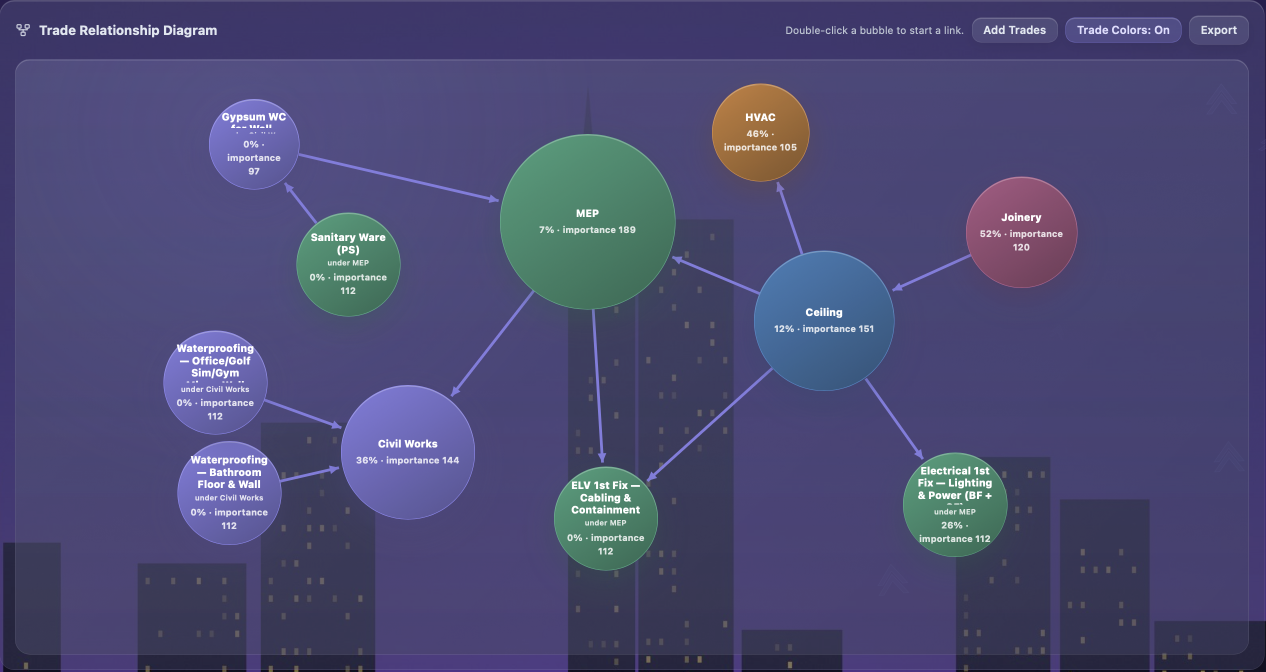
Explore the real screens ↗Follow relationships between trades. A ceiling decision can depend on MEP, joinery and the work that comes before it.
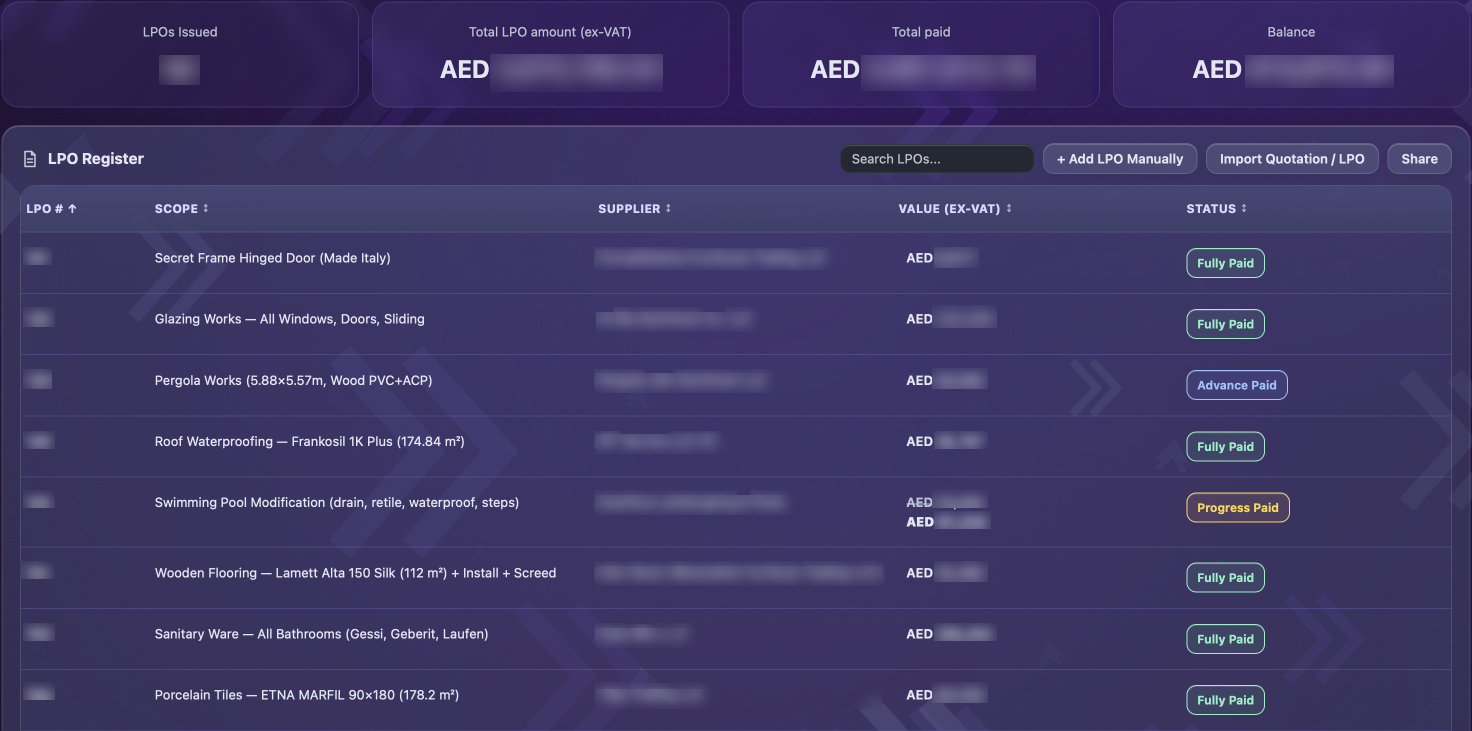
Explore the real screens ↗See the scope, supplier and payment status together. Fully paid, advance paid and progress paid remain distinct—so the next conversation starts with context.
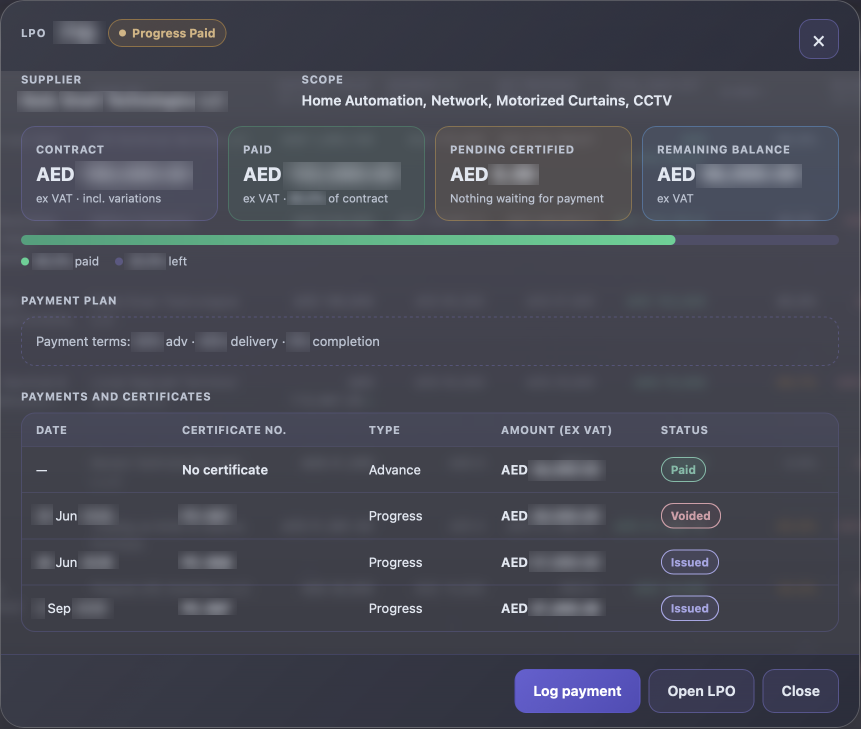
Explore the real screens ↗Open the detail to see the contract, payment plan and certificates together. Paid, issued and voided records stay visible in the same place.
Explore the real screens ↗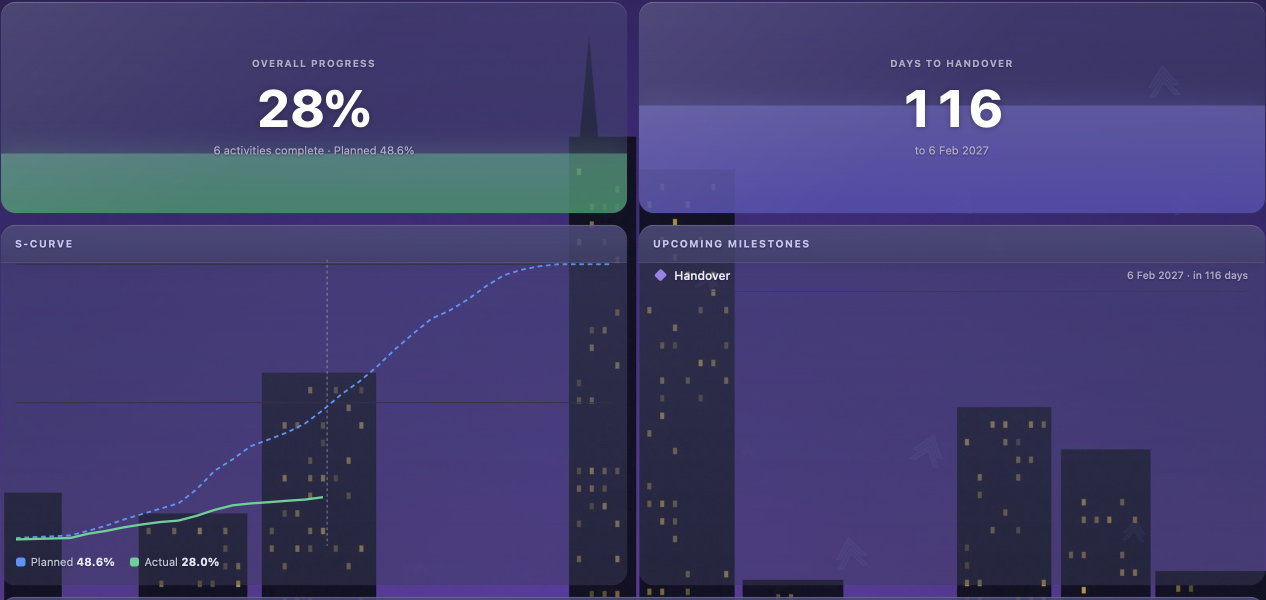
Real product screens. Sensitive details blurred.
See the priority. Make the decision. Keep everyone connected.
Interactive sample · real product captures below.
Try it — tap any tab
ARCHONPROJECT COMMANDExplore the actual Archon interface.
Select a view, then open it for a closer look.
Real product screens. Sensitive details blurred.
A short sequence of demo screens.
Teams brings messaging, the approvals feed and notifications into Archon. Keep your team connected to the work that needs attention.
See Teams in your demo ↗YOUR TEAMPersonal to-dos, reminders and a weekly calendar. A dedicated workspace for your own commitments.
Bring shop drawings, plans and presentations through Designer → Head of Design → PM review. Keep revisions and the approval journey together.
Clients sign submittals and method statements online. The signed PDF is emailed to everyone involved, with a clear record of the decision.
Keep weekly progress photos, snags, NCRs, incidents and project documents in the project record, through delivery and handover.
Define company stages, roles and permissions. See who approved, when they signed, and the record behind the decision.
Discuss your workflow ↗Data isolation. Role-based access. Audit trail.
Explore all fourteen areas of Archon.
Schedule, Gantt, S-curve, progress, risks and extension-of-time tracking.
Numbered approval stages for each company, with digital signatures on every LPO and payment certificate.
LPO register, payment plans, certificates and payment tracking, plus project and master cash flow.
Create a BOQ from an accepted quotation. Track budget, committed and paid amounts, with live margin per line and per-person visibility of quantities, selling prices and costs.
Quotations, UAE tax invoices with VAT and TRN, credit notes and receipts. Import Excel or PDF and apply margins in bulk.
Clients approve submittals and method statements with an email code and signature. The signed PDF is emailed to all participants.
Shop drawings, plans and presentations move from Designer to Head of Design to PM. Preview PDF, DXF, GLB, FBX, OBJ, IFC and 360 renders.
Clients and consultants follow progress, photos and reports through dedicated access, without commercial data.
Weekly progress photos, snags, NCRs, site incidents and documents, organised per project.
Built-in messenger, approvals feed and notifications keep project conversations and decisions together.
To-dos with reminders and a weekly calendar for your own work.
Your company logo, header colour and branded documents, across your project workflow.
English, Arabic, French and Russian.
Each company’s data is separated. Roles and permissions control access, and every approval is recorded with its time and signature.
Choose the package that fits how you work. Talk to us about personal tools, team collaboration, approval requirements, users, projects and storage.
A starting point for exploring Archon.
Manage everyday project work, with a clear focus on your tasks and priorities.
Bring project conversations, the approvals feed and notifications together for your team.
Shape approval chains around your organisation. Discuss custom stages, roles and additional workflows with us.
User, project and storage allowances are confirmed with your plan. Contact us for details.
Each company’s data is separated. Roles and permissions control access, while approvals record the time and signature. Contact us to discuss your organisation’s requirements.
Yes. Request a free trial below. Our team will confirm access and the trial’s duration, project and storage allowances.
Archon supports English, Arabic, French and Russian.
Archon runs in a web browser across desktop, tablet and phone, so you can stay connected in the office and on site.
Email support@archonpm.app for product help, trial questions or plan enquiries.
Request a demo, start a free trial or discuss a plan with our team.
support@archonpm.app